


News
How to Set Up a Solar Panel System
News | May 30,2026
At first glance, solar power can seem incredibly intimidating. The technology harnessing the sun radiation and converting it into electricity to power a refrigerator or a whole home is some of the most sophisticated engineering in the world. But here is the good news: you do not need to be an electrical engineer to understand how to set up a solar panel system.
Thanks to massive leaps in consumer-friendly renewable energy technology, setting up your own solar array is more accessible and affordable than ever before. Whether your goal is to achieve total energy independence, build a reliable home backup system, or go off-grid in a recreational vehicle, taking control of your power generation is a smart financial decision.
Setting up a personal solar installation can save you significant money on labor costs while protecting you against skyrocketing utility rates and unpredictable grid blackouts.
If you are ready to kick off your personal renewable energy revolution, follow this comprehensive, step-by-step guide on how to set up a solar panel system from scratch.
1. Calculate Your Power Load

Before you buy a single wire or panel, you must understand your actual energy demands. Buying a system without knowing your power load is like buying a pair of shoes without knowing your foot size. The power load for a whole-home backup system will look drastically different from a small camper setup.
How to calculate your power load:
- List Your Appliances: Make a detailed list of every device you want to power.
- Find the Wattage: Check the product label or instruction manual for the running wattage and the starting surge wattage.
- Calculate Daily Watt-hours (Wh): Multiply the running wattage by the number of hours you plan to use the device daily. For instance, a 50W laptop running for 4 hours requires 200 Watt-hours.
Common Appliance Energy Consumption Table
| Appliance | Average Running Watts | Estimated Daily Usage | Total Daily Watt-hours |
|---|---|---|---|
| LED Light Bulb | 10W | 5 hours | 50Wh |
| Laptop Computer | 50W | 8 hours | 400Wh |
| Energy Efficient Fridge | 150W | 8 hours (cycles) | 1,200Wh |
| Microwave Oven | 1,000W | 0.5 hours | 500Wh |
| Window AC Unit | 1,200W | 4 hours | 4,800Wh |
Always aim to reduce your power consumption before you even begin calculating your array size. By swapping old appliances for high-efficiency models and transitioning to smart LED lighting, you establish a much lower baseline. This step is incredibly critical when you apply the 20 percent rule for solar panels during your system design.
Because this industry-standard rule requires you to oversize your system by 20% to account for real-world efficiency losses, failing to minimize your initial load means you will be paying a massive premium to oversize a system for inefficient appliances.
2. Choose Your Solar Panel Array

Once you know your daily Watt-hour requirement, you can determine exactly how many solar panels you need. Sizing a solar panel array is not a direct mathematical equation where 400W equals exactly 400W of constant output.
A 400W solar panel will not produce its maximum rated power every single hour of the day. Its actual output depends on weather conditions, seasonal shading, and the peak sun hours in your specific geographic location.
To account for energy loss in the wires, inverter inefficiency, and cloudy days, solar professionals use a production ratio. This ratio is typically estimated between 1.3 and 1.6 depending on your climate.
The System Sizing Formula
Total Daily Energy Need (Wh) divided by Peak Sun Hours divided by System Efficiency (typically 0.80) equals Total Solar Array Wattage Needed.
For example, if you need 5,000 Wh per day and you live in an area that gets 5 peak sun hours, you will need roughly a 1,250W solar array to comfortably meet your daily needs. That translates to about three 400W panels or four 350W panels.
3. Select the Solar Panel Type

Not all solar panels are created equal. You must choose the right photovoltaic cell technology and the correct physical design for your specific project environment.
Monocrystalline, Polycrystalline, or Thin Film
- Monocrystalline: Made from a single, pure silicon crystal. These are the undisputed leaders in modern solar technology. They boast the highest efficiency ratings (often exceeding 22%) and perform exceptionally well in low light. While they carry a slightly higher price tag, their space-saving efficiency makes them the top choice for residential setups.
- Polycrystalline: Made from melted silicon fragments. They are cheaper to produce but less efficient (around 15% to 17%) and take up more physical space on your roof to generate the same amount of power.
- Thin Film: Lightweight and flexible, but notoriously inefficient (7% to 12%). They are generally only recommended if you have strict weight limits or highly curved surfaces where traditional panels cannot be mounted.
Rigid, Flexible, vs. Portable
- Rigid Panels: Encased in aluminum frames and tempered glass. They are the most durable, weather-resistant, and offer the best value per watt. They are ideal for house roofs, backyard sheds, and sturdy vehicles.
- Flexible Panels: Great for curved surfaces like marine boats or custom camper vans. However, they can suffer from heat buildup and typically have a shorter overall lifespan than rigid panels.
- Portable Panels: Foldable and incredibly user-friendly. They are perfect for camping trips or temporary emergency backup situations where a permanent installation is not possible.
4. Select the Energy Storage Solution

Unless you are building a strict grid-tied system without any backup capabilities, you need a place to store the energy generated by the sun for nighttime use. You have two main routes here: building a custom battery bank or buying an all-in-one portable power station.
If you are building a custom battery bank, Lithium Iron Phosphate (LiFePO4) is the industry standard for 2026. Unlike outdated Lead-Acid batteries that are heavy, require frequent maintenance, and can only be safely discharged to 50%, LiFePO4 batteries can be discharged to 100%.
They easily last for 3,000 to 5,000 charge cycles, representing over a decade of daily use, and they are incredibly safe due to their stable thermal chemistry.
For those looking for a simpler setup, a portable power station is an excellent alternative. These compact units combine the battery, inverter, and charge controller into one neat, plug-and-play box. You simply plug your solar panels directly into the unit, skipping the complex wiring process entirely.
5. Purchase the Balance of System

If you choose to build a custom system rather than buying an all-in-one power station, you need to purchase the Balance of System. These are the critical electrical components that make the whole setup function safely and efficiently.
- Charge Controller: This acts as the brain of the operation. It regulates the voltage coming from the solar panels to prevent battery overcharging. Always choose a Maximum Power Point Tracking (MPPT) charge controller over a Pulse Width Modulation (PWM) controller. MPPT controllers are up to 30% more efficient at harvesting energy.
- Inverter: Solar panels produce Direct Current (DC) and batteries store DC power. However, your household appliances use Alternating Current (AC). The inverter translates DC into AC. Ensure you buy a Pure Sine Wave Inverter to protect sensitive electronics like laptop computers and medical equipment.
- Mounting Hardware: Z-brackets, aluminum rails, and appropriate roof sealants.
- Wiring: UV-resistant solar cables, usually 10 AWG depending on your amperage.
- Safety Fuses and Breakers: Absolutely non-negotiable components required to prevent electrical overloads and potential fires.
6. Gather the Necessary Tools and Components
Preparation is the secret to a smooth installation process. Before climbing onto a roof or drilling any holes, gather all the necessary tools:
- Digital Multimeter: The most important tool you will own for this project. You must test voltage and electrical polarity before making any live connections.
- Wire Strippers and Crimping Tools: Essential for making secure connections with MC4 solar connectors.
- Battery-Operated Drill: Along with appropriate drill bits for your roof type.
- Socket Wrenches: For tightening mounting brackets and rails.
- Industrial Roof Sealant: Products like Dicor or Sikaflex are required to prevent water leaks if you are roof-mounting your panels.
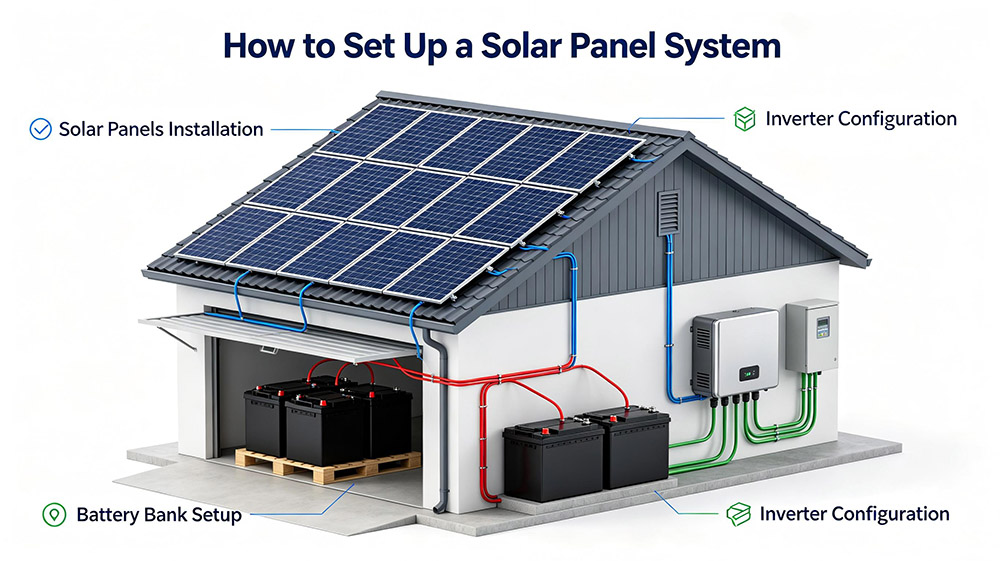
7. Understand the Electrical Workflow
Before you cut a single wire, visualize the flow of electricity. A fundamental error in understanding this directional flow can result in blown fuses or damaged equipment.
Here is the exact path the energy takes through a standard system:
- Solar Panels (The Source): Harvest sunlight and generate high-voltage DC power.
- Charge Controller (The Regulator): Steps down the high voltage from the panels to a safe, steady voltage to charge the battery bank.
- Battery Bank (The Vault): Stores the DC energy chemically for later use.
- Inverter (The Translator): Pulls DC power from the battery and turns it into 120V or 240V AC power for your standard wall outlets.
Always place appropriately sized safety fuses between the panels and the charge controller, the controller and the battery, and the battery and the inverter.
8. Mount the Solar Panels
Your mounting location heavily dictates your system efficiency. You generally have three choices: roof mounts, ground mounts, or pole mounts.
- Roof Mounts: The most popular choice for homes because they utilize otherwise wasted space. You must ensure the panels face True South (if you are in the Northern Hemisphere) for maximum daily sun exposure. Use copious amounts of marine-grade sealant on any holes you drill to prevent water ingress into your home.
- Ground Mounts: Excellent if you have available acreage. They are easier to install safely, easier to clean, and can be manually tilted throughout the year to perfectly match the sun changing seasonal angles.
- The Shading Warning: When selecting a mounting location, watch out for trees, chimneys, or air conditioning units. If you wire your solar panels in series, even a 10% shadow on one single panel can drop the entire array output by 50% or more. If you expect partial shading throughout the day, wiring your panels in parallel is a much safer design choice.
9. Set Up the Inverter and Charge Controller
Now it is time to wire the system. The exact sequence in which you connect these components is a critical matter of equipment safety.
The golden rule of solar wiring is to always connect your battery to the charge controller first. Never connect solar panels to a charge controller that is not already hooked up to a battery bank. If you do, the incoming high voltage from the sun has nowhere to go and will instantly destroy the internal circuitry of the charge controller.
First, connect the battery bank positive and negative terminals to the charge controller. The controller digital screen should immediately light up, recognizing the battery voltage system (such as 12V, 24V, or 48V).
Next, connect the inverter directly to the battery bank using thick, heavy-duty cables (like 4/0 AWG depending on the inverter size), making sure to install a heavy-duty breaker in between the two components.
10. Connect the Solar Panels to the Battery System
With your charge controller powered on and ready to accept power, it is time for the final step.
Route the heavy UV-resistant solar extension cables from your mounted roof panels down to your charge controller. To prevent dangerous electrical sparks, it is highly recommended to either throw a heavy opaque blanket over your solar panels or install a DC disconnect breaker switch inline.
This ensures no live current is flowing while you make your final bare wire connections. Plug the positive connector into the positive PV line of the charge controller, and the negative to the negative.
Once securely connected, remove the blanket from the panels or flip the DC disconnect switch to the “On” position. Check the charge controller screen or your connected smart application. If you see wattage flowing in and the battery voltage slowly rising, congratulations! You have successfully built a working solar power system.

Conclusion
Transitioning to renewable energy is one of the most rewarding investments you can make for your property. While the question of how to set up a solar panel system might initially seem fraught with complex equations and wiring schematics, breaking it down into logical, manageable steps makes it entirely achievable.
Whether you opt for the ultimate convenience of a plug-and-play portable power station or take pride in custom-wiring a heavy-duty battery bank, the key to success is careful planning.
Always calculate your electrical load accurately, use the correct gauge wires, and prioritize proper safety connections. By following these guidelines closely, you will be able to enjoy decades of clean, reliable energy delivered straight from the sun.
--- END ---
Prev: The True Cost to Install Solar Panels Yourself in 2026: A Complete DIY Guide
Already the latest article


